 Tucky
Tucky
Push to Talk Dictation on Mac: A Fast System-Wide Voice Setup
Replace slow Apple Dictation with an instant push to talk shortcut on Mac. Speak into any app with private on-device cleanup and zero cloud lag.
Tucky is voice to text for your whole Mac. Press a hotkey, speak, and polished text appears wherever your cursor is. We spend our days prompting AI now, and prompts don’t need perfect wording. They need your thinking, fast. Speaking is the fastest way to get it out.
Watch the story · 1 min 50 sec
English audio · captions available
It starts small. A prompt you can’t quite type. Press a key and say it out loud. The words appear at your cursor, cleaner than you said them. Strange at first. Then surprisingly natural.
Day one, talking to your laptop feels strange. By the end of the week, you’re speaking emails, code comments, and that message you’ve been putting off. Then you try: “Tucky, make this an email.” Your thoughts, with a little structure. Still in your voice.
“Tucky, format this as an email… hey Sarah quick one, sprint review moved to Thursday 3pm, can you update the calendar and double-check the demo build works”
Hi Sarah,
Quick heads-up: the sprint review has moved to Thursday at 3 pm. Could you update the calendar invite and double-check that the demo build is working?
Thanks!
Then one evening, you open the library. The thoughts you saved this week are sitting there, searchable. And you wonder: if my thoughts are worth keeping, what about my conversations?
Tucky notices when you join a Zoom, Meet, or Teams call and records it if you want it to. You get a live transcript as the call happens. Set up a template for what a great call looks like — a sales call, a discovery call, an interview — and Tucky tracks what’s been covered and suggests the next question in real time. None of your ideas get missed.
Website launch meeting
Decision
The new website goes live on Friday.
Next steps
Record a narrated product demo, client walkthrough, or bug report. Edit the recording locally, then export it or upload it to Google Drive. Generate a transcript when you want to search the narration.
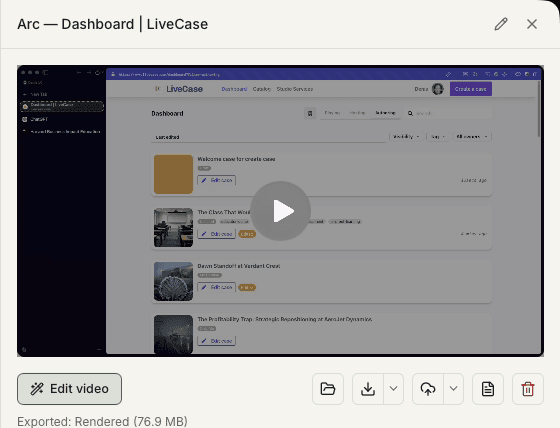
Weeks go by. Meeting notes, ideas, a walkthrough you narrated for a client. Bring them together by project, then ask: “What did we decide on pricing with Acme?” Get an answer with sources you can check.
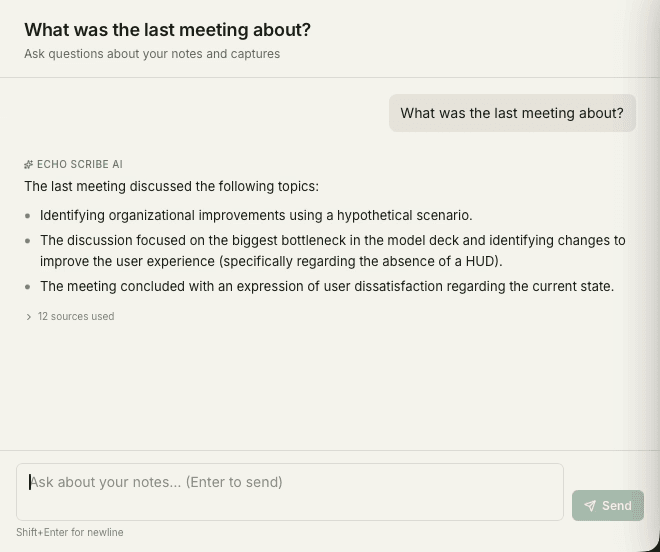
Ask questions about your saved work and inspect the sources behind each answer. Optional daily recaps are still being improved. For deeper prompt or workflow reviews, export notes or connect a compatible AI tool through MCP; that tool performs its own analysis.
Each capture method feeds the next. First your voice replaces the keyboard. Then your meetings and screen recordings join in. Everything lands in one searchable place — and once it’s all there, Tucky can tell you what happened, what matters, and what to do next.
See how the loop worksPress a hotkey and talk. Clean text lands in any app: AI chats, email, Slack, code.
Record Zoom calls with live transcription and call guidance, and narrate screen recordings for clients.
Choose project tags yourself or enable automatic suggestions, then check the result.
Daily recaps, chat with your history, export to ChatGPT, and see what to automate next.
One tool, a lot of jobs. Here’s what Tucky ends up doing for people.
Talk your prompts into ChatGPT, Claude, or Cursor. Rough wording is fine — speed is the point.
Customizable meeting guides, post-call feedback, and structured notes to review and export to your sales tools.
Screen record proposals, demos, and handoffs instead of scheduling another meeting.
Every call transcribed and summarized. Find any decision in seconds, weeks later.
Every idea captured and searchable. Chat with your history and get answers, not files.
Use exports or an MCP-connected AI tool to review repeated prompts and identify workflow changes you can make.
Tucky recognises the command and keeps your computer awake for the requested duration. Use it while a long-running command finishes or a queue of AI prompts works through its next steps.
Press your usual dictation hotkey and say:
“Tucky, keep my computer awake for two hours.”Replace slow Apple Dictation with an instant push to talk shortcut on Mac. Speak into any app with private on-device cleanup and zero cloud lag.
Can ChatGPT take notes from a Zoom call? Learn how to get automated meeting notes, transcripts, and summaries on your Mac with zero cloud bots.
Run a truly private AI assistant on your Mac without an account or cloud fees. Dictate notes, capture meetings, and search your work locally with Tucky.
No cloud backend. No account. No data sold. Dictation, recordings, transcripts, and project context stay under your control on your Mac.
Dictation uses your hotkey. For supported meeting apps, choose always record, ask first, or never. Screen recording starts when you launch it.
Core transcription and local AI work offline after model downloads. Google Drive uploads, downloads, updates, and external AI services need a connection.
Core app features need no Tucky account. Optional Google Drive sharing requires connecting your Google account.
Notes live in a SQLite file on your Mac. Export it, back it up, or delete it — full control, always.
Download Tucky for Mac. No Terminal or Homebrew required.
Open the DMG, drag Tucky to Applications, then open Tucky from Applications.
Developer ID signed and Apple-notarized.